
How to Setup a (Simple email service ) SES in AWS
1. Create a new domain in SES AWS
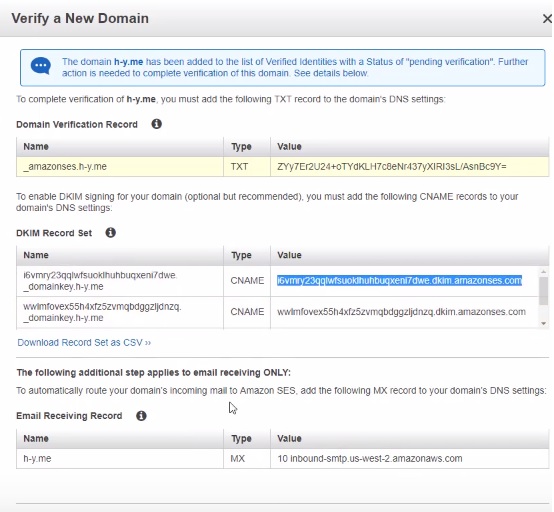
you need the add few line of record to your DNS.
copy all the things except .yourdmain to your DNS cPanel
Reference about How to Setup a SES
2. Prepare sendmail.php file
//------------------------
// 電子郵件的本文
// use PHPMailer class
//------------------------


$mail= new PHPMailer(); //建立新物件

$mail->IsSMTP(); //設定使用SMTP方式寄信
$mail->Host = "email-smtp.XX-XXXX-1.amazonaws.com";
$mail->SMTPAuth = true; //設定SMTP需要驗證
$mail->Username = "AXXXXXXXXXXXXXXXXXXX";
$mail->Password = "BMPAZuXXXXXXXXXXXXXXXXXXXXXXXXXXXXXX";
$mail->Port = 465;  //Gamil的SMTP主機的SMTP埠位為465埠。
$mail->SMTPSecure = 'ssl';
$mail->From = 	  "admin@yourdomain.com"; //設定寄件者信箱
$mail->FromName = "admin@yourdomain.com"; //設定寄件者姓名
$to = "testing@hotmail.com";
$mail->AddAddress($to); //設定收件者郵件及名稱
$mail->CharSet = "utf-8"; //設定郵件編碼
$mail->Subject = $subject; //設定郵件標題
$body1 = "親愛的[$custname] : <br />";
$body2 = $body1 . $body . $footer  ;
$mail->Body = $body2; //設定郵件內容
$mail->IsHTML(true); //設定郵件內容為HTML

$strTemp = $to;
$strTemp = trim($strTemp);

    if ($strTemp != '')
    {
        if (!$mail->Send()) {
			echo "message colud not be send :" . $to;
			echo "Mailer Error:" . $mail->ErrorInfo;
			exit;
		} else {
			echo "Mail Has Been Send :" . $to;
		}
	}


if($counter+1 % 100 == 0)
{
	echo '</br>' . $counter . ": Mail Has Been Send :" . $to;
	sleep(15);
}

$counter=$counter+1;

		}

echo "</br> finish send mail!!!";
}

?>